Pages

Search This Blog

Showing posts with label recording. Show all posts

10.15.2012

Featured Equipment: IK Multimedia Total Studio 3 software bundle

IK Multimedia Total Studio 3 software bundle
The Total Studio 3 bundle is the most complete solution for any DAW available on the market today, with a collection of 8 award-winning plug-ins, including 5 virtual instruments and 15 multi-sampled instrument Xpansion Tank 2 titles, plus 3 essential effects plug-in suites — with over 170 accurately modeled effects — covering every guitar, bass, mix and mastering need. The bundle is available at an amazing price that’s 80% lower than the cost of buying the components individually.
Find out more: Total Studio 3

The Total Studio 3 bundle includes:

Virtual Instruments and Sounds:
  • SampleTank 2.5 XL
  • Sonik Synth 2
  • Miroslav Philharmonik
  • SampleMoog
  • SampleTron
  • 15 Xpansion Tank 2 Multi-Sampled Instrument Collections
Guitar & Bass Gear:
  • AmpliTube 3
  • including:
    • AmpliTube Jimi Hendrix™
    • AmpliTube Metal
    • AmpliTube Custom Shop
Mixing & Mastering:
  • T-RackS 3 Deluxe
  • Mastering Suite
  • CSR - Classik Studio Reverb
Get IK Multimedia Total Studio 3 at Revolution Audio

9.10.2012

Featured Equipment: Audio-Technica AT4040SP Mic Pack

Audio-Technica AT4040SP Mic Pack
The AT4040SP Studio Pack offers two of Audio-Technica’s renowned 40 Series studio condenser microphones: the AT4040 large-diaphragm side-address condenser and the AT4041 cardioid condenser. Each microphone is transformerless, resulting in exceptional transient response and extremely clean output signals; each is engineered to meet the most critical acoustic requirements of professional recording, broadcast and live sound. A shock mount, stand clamp and windscreen are included, along with a protective wooden carrying case.

Find out more: Audio-Technica AT4040SP

   
 AT4040 Side-address cardioid condenser microphone
  • Technically-advanced large diaphragm tensioned specifically to provide smooth, natural sonic characteristics
  • Externally polarized (DC bias) true condenser design
  • Exceptionally low noise, wide dynamic range and high-SPL capability for greatest versatility
  • Transformerless circuitry virtually eliminates low-frequency distortion and provides superior correlation of high-speed transients
  • Precision-machined, nickel-plated brass, acoustic element baffle provides enhanced element stability and optimal sensitivity
  • Open acoustical environment of the symmetrical housing assembly minimizes unwanted internal reflections
  • State-of-the-art surface-mount electronics ensure compliance with A-T's stringent consistency and reliability standards
  • Switchable 80 Hz hi-pass filter and 10 dB pad
AT4041Cardioid condenser microphone
  • Smooth, extended frequency response with a slight rise occurring in the high-frequency region
  • Ideal for drum overheads, acoustic guitar, piano, horns and under snare
  • Low-mass diaphragm improves transient response, increases response bandwidth and reduces handling and mechanical noise transfer
  • Transformerless circuitry virtually eliminates low-frequency distortion and provides superior correlation of high-speed transients
  • State-of-the-art design and manufacturing techniques ensure compliance with A-T's stringent consistency and reliability standards
  • Switchable hi-pass filter and rugged turned-brass microphone housing
Buy Audio-Technica AT4040SP at Revolution Audio.

6.17.2012

Re-amping Explained

Re-Amping is a technique used by recording and mixing engineers to process recorded audio with analog hardware specifically guitar equipment.
In our direct box basics article we explained the use of a direct box in the studio, a re-amp box is used to take that clean direct guitar or bass signal and run it into a guitar amp if needed later on in the production process.
See all DI and Re-Amp boxes at Revolution Audio

What does a re-amp box do?
It is often said that a re-amp box is just passive DI box in reverse, which is untrue. A DI box converts a high impedance, unbalanced instrument level signal to a low impedance, balanced mic level signal. A re-amp box converts a low impedance, balanced line level signal to high impedance, unbalanced instrument level signal.

The goal of the re-amp box is to make the amplifier react in exactly the same way a live guitar would, but with a pre-recorded audio source. Without the re-amp box there will be an impedance mismatch and loss of tone. Hearing your guitar rig play itself can take some getting used to!


How to?
Once you have the clean DI recorded, set the track's output to analog out 3 of your interface (you will need an interface with more than just monitor outputs). No other tracks should be set to this output.  Connect output 3 of the interface to the Re-Amp box with a TRS to XLR-M cable. Connect the Re-Amp to your pedals or amplifier with a standard instrument cable. Check that you are getting a good signal to the amplifier, adjust the output level to match a live guitar input.
If the signal is noisy, try the ground lift switch.
Record the amplifier as normal with one or more microphones.
Double check your routing to prevent feedback.


Why Re-amp?
The decision to re-amp could be for a number of reasons:
  • Convenience - You may like to write and record guitar parts at 3 AM but your neighbours don't just don't understand. Record with an amp simulator silently and re-amp through your big rig later.
  • Budget - There are many professionals with big amp collections offering a Re-amping services for much less than the cost of even renting the amp of your dreams.
  • Experimentation - After you've got the perfect take captured you can experiment with different amp, cab, mic and positions as much as you like.
  • Plan B - All too often we are rushed in the studio, it's easy to make a mistake with mic position or perhaps just a bit too much overdrive than we'd like. If the performance is fine we just have to tweak the amp.
For best results
While there are many fancy direct boxes, if you are planning on re-amping you will likely find the best results are achieved through the simplest direct capture. A Tube DI or Tube preamp may be too colored and change the sound of your amp. Warming up the sound of the mic on the amp, rather than the DI is the better option. Feel free to experiment of course.

Usually the signal you send to the amplifier will be completely unprocessed, however you may wish to experiment with gating, light compression, and EQ.

Much like the way your guitar volume affects the character of the amp, sending the right level out of your DAW can be critical.

Options
The Canadian company Radial Engineering offers several Re-Amp devices for home and professional studios:
Radial REAMP JCR $199.99
Radial X-Amp Active Re-Amp $199.99
Radial ProRMP $119.99
Radial Re-Amping Kit (includes X-Amp and J48 active DI)

5.16.2012

Long Distance Music Collaboration


I recently started a long distance collaboration project with a friend in Australia. It's going well but it took a little while to get workflow and organization figured out. There are different considerations than I normally deal with day to day in a studio with musicians coming here. We're both recording and mixing as we go and transferring a lot of files back and forth, taking turns adding parts.
This article will go over some of the things to consider when doing long distance music collaboration.
Collaboration Screenshot
Use the same DAW
If all collaborators are using the same DAW it makes things much easier. Use the stock plugins wherever possible. Pro Tools, Logic, Cubase, it doesn't really matter which one but it's a big advantage to use the same one. We chose to do these projects in Reaper as this is my main DAW and one Joel has been wanting to learn, and can demo free.


Transferring files and backup
Normally I would recommend Dropbox for collaboration, I've used it before and actually ran the projects right from the shared folder. It's nice because you don't have to worry about transferring or backup. Because this project is going to be 4-6 songs we'd likely run out of space quickly especially when we get real drums on the songs. So for this project I just set up an FTP account and use the storage that comes with my website. Backup is taken care of automatically as all files are now saved in 3 places.


Versioning
For each turn in the project as it gets passed around gets a new version number. "Project 01-4" would be the forth time something was done on the project. Doing a "save as" for the project file avoids confusion as to which is the most recent. We're keeping it simple but you could take this further, odd numbers for you and even version numbers for the partner.


Printing FX
It's unlikely that you'll have an identical system and set of tools as your collaborator. You will want to use the best or most familiar tools you have available to get the best sounds. To make this more collab friendly, you have to commit and print these effects as audio files. Sometimes that means using the freeze or render function, or routing the audio internally to a new track. You don't have to delete the originals of course, but if it sounds good why not just stick with it? For our project this means rendering the virtual drum patterns as audio files, and printing my special reverbs as audio.

DI Tracks
Similar to the above, with guitars and bass with virtual amps, it's likely you will want to tweak or completely change the sound later on as the ideas turn into a song. Even if you're recording with amps and mics, splitting the signal with a DI will give you both options or at least a backup.


Communication
One thing we've found to help keep excitement and momentum for the project is all the ways we can communicate these days. We use Twitter, Facebook, email, and Instagram to talk about the project share photos and prod one another if we're taking too long for a turn. It's a lot of fun and we're pushing each other to play better and be more creative.

Don't let geography get in the way of music making. Find people you want to work with and just do it. Be open to experimentation, play your best and be honest with your partner. Most of all have fun.

5.09.2012

Alan Parsons Master class recording workshop in Toronto

On May 26th at Noble St. Studios in downtown Toronto, a very cool event is happening. GlobalMusicDepot is putting on the Alan Parsons' Master Class and Training Session.

It's a one of a kind studio session with legendary producer Alan Parsons, a team of pro players in one of Toronto's top studios.

This limited seating event isn't free of course, GOLD level admission costs $400 and gets you a seat in the Noble Street lounge with A/V feed of the event. The PLATINUM level ticket for $800 you get into the control room with Alan as the magic happens.
Both ticket levels include the $150 value Art & Science of Sound Recording 3 DVD set.

Order GOLD level admission to Master Class
Order PLATINUM level admission to Master Class.


Global Music Depot is proud to announce the first Canadian Master Class Training Session with Alan Parsons, at the fabulous Noble Street Studios in Toronto on May 26, 2012.
Attendees of this incredible experience will have the rare opportunity to participate in a recording session with the legendary Alan Parsons in the producer’s chair. Session musicians for the event feature the acclaimed Toronto band, the David Barrett Trio (plus one).
This 1-Day hands-on session is suitable for those with some knowledge of DAW recording and experience as musician, engineer, or producer.  Also fitting for music production/recording students and home studio enthusiasts.  Live tracking; vocals and basic mixing will be covered.  Attendees get to witness all stages of a recording session with Alan Parsons, from tracking to overdubs (including lead and backing vocals) to mixing.
All attendees will receive a free copy of the Alan Parsons’ 3 DVD set – The Art & Science of Sound Recording (Retail Value $149.99) as well as a “By Invitation Only” ticket to the evening’s VIP “Meet & Greet” event. 
Alan Parsons has been conducting these Master Classes for the past 3 years and they consistently sell out!!  GOLD-level seating is extremely limited.  Don't delay!

Here's a video recap of the recent LA Master Class session

5.01.2012

Featured Equipment Of The Week: RME Fireface UCX

RME Fireface UCX USB/Firewire Interface
The Fireface UCX is a highly integrated pro audio solution in an ultra-compact format for studio and live recordings. It continues RME's long tradition of designing compact high-end interfaces, packing into a half-rack size unit what usually would be spread out over two or three 19 inch panels.

The result is an awesome combination of RME's most successful products: Fireface UFX, Firefaces UC/400 and Babyface. The Fireface UCX is not just a smaller version of the smash hit UFX, with the HFX-core, the preamps and the complete effects engine, the UCX continues the tradition of RME's tremendously successful compact interfaces, and combines it with the great usability of the Babyface through the included RME remote.
 Find out more: Fireface UCX

 
Top Features
  • Low Latency mastering grade converters with outstanding specifications.
  • Two mic preamps with the premium technology from RME's high-end recording bestsellers Micstasy and UFX, including the AutoSet overload protection.
  • A newly developed Hammerfall audio core, supporting USB and FireWire with the maximum performance and ultra-low latency operation, combined with the legendary RME driver stability and maintenance, on both bus protocols.
  • TotalMix FX with the complete Fireface UFX DSP engine, including all effects up to 192 kHz.
  • Monitoring Controller: combining the impressive flexibility of the TotalMix FX monitoring tool set and the included RME Remote Control.
  • RME's unique DIGICheck metering and analysis toolbox for Windows PC and Mac.
  • Plus support for RME's Advanced Remote Control, active jitter suppression technology, professional reference level support, advanced stand-alone functionality, full 192 kHz operation, and last but not least two high speed MIDI I/Os.
  • On top of it: The Fireface UCX is the first professional audio interface with Class Compliant mode to work with Apple's iPad, for perfect stereo up to 8 channel recording and playback, and the addition of truly professional I/Os.
Check out all the details: Fireface UCX USB/Firewire audio interface

4.16.2012

Direct Box Basics


What is a DI box?
A DI box aka Direct Inject or Direct box is a tool we use in the studio to bring a signal from an instrument (guitar, bass, keyboards) directly into our recording system.

An audio engineer (or home recording enthusiast) will use the DI box for silent recording, as a backup or to process along with a microphone on an amplifier.

Connections
The DI box typically has 3 input and output connections.
  1. 1/4" TS instrument input - electric guitar or bass connects here
  2. XLR-M balanced output - connects to mic preamp
  3. 1/4" TS Thru - Continues the input path to connect to an amplifier.

For example, the DI box would be connected between an electric bass and audio interface mic input. The clean bass signal can be recorded without the need for an amp.

Functions
The DI box has a few functions.
  1. Impedance change - The instrument circuit will react correctly as if it was connected to an amp, and the mic preamp on the other side of the box will react as if a mic was connected.
    Without this the tone would be wimpy.
  2. Level change - An electric guitar outputs a signal that is relatively low level but significantly higher than the average microphone. The DI box steps the signal down from instrument to mic level.
  3. Unbalanced to balanced connection - Changing the unbalanced guitar signal to balanced mic level allows much longer cable lengths without signal loss or noise.
  4. Pass through - The instrument signal is split and can be continued to an amplifier.
The Hi-Z/instrument input on your audio interface preamps do most of these functions well but a high quality DI box tends to work a bit better and allows you to split the signal to continue to pedals and amplifier.

DI Box options
There are a wide variety of DI boxes on the market today in passive, active, multi-channel, and vacuum tube designs. You can browse our DI box category here: DI Boxes & Re-amps.

A passive DI is just a transformer with a few jacks connected, it doesn't require any power. The Radial JDI is a very popular professional Passive DI Box.

An active DI is a more complex design that requires phantom power (supplied by the mic preamp).
The Radial J48 is a very popular professional Active DI Box.
Different designs, same price. Both proven professional tools used in studios worldwide.

Generally speaking, they both do the same job well. In specific uses or if you are looking for less transparency, one may type may be better than other.

There are also many designed specifically for bass recording with tone controls and overdrive or amp simulation circuitry.
The Radial Bassbone is an exceptional Bass DI/Preamp.

4.03.2012

Double Tracking Guitars

Double-neck guitar optional
Double tracking is a very common recording/production technique for almost any genre of music. When it comes to rhythm guitars, this technique is almost a standard method of recording with single tracking used only for solos.

This is also a technique that is often confusing for beginners.Double tracking simply means recording the same part twice and panning each to opposite sides. This creates a wide stereo spread based on the unique nuances in timing and dynamics of each performance. This is the guitarist playing a section of the song perfectly, then repeating it as closely as possible on a second track.

This isn't the same as recording in stereo, using two mics, using a chorus effect or duplicating and delaying one side. Some of these techniques are ways of 'faking' or 'automatic' double tracking, but are simply no substitute for an expertly performed double track. There must be two separate performances for the effect to work.

How To double track guitars
1 - record mono rhythm guitar, with either a microphone on a real amp or virtual amp. This track would be panned center.
2 - when a good take is achieved, and any punch ins are finished, go through the recorded track and tighten up any timing issues.
Here's how it sounds with the first guitar along with drums. The guitar is in the middle.
[mono guitar] (warning heavy metal!)
3 - after editing, pan this guitar (and any extra mics for this performance) to the left.
4 - That was perfect, now play it again! Make a new track and pan it right.
5 - repeat steps 1 and 2 using the same guitar, pickup selection, amp, microphone and any other variables unchanged. Making a change will increase the stereo width but will often result in an unbalanced tone.
Here's the same part with the doubled guitars.
[doubled guitar]

This repeats for each section of the song and if there are multiple guitar parts written or two guitarists in the band, usually each will be double tracked. If there are two guitarists in the band, there could be some confusion. Guitarist 1 plays all his parts twice, guitarist 2 plays all his parts twice. In a simple song this would mean 4 tracks for the rhythm guitars. Often this gets up to 12 or 16 tracks pretty quickly. Guitar solos are usually right up the middle or 'stereoized' with other techniques to make them pop out.

You have to be careful playing the doubled part, if it's too far off from the original it will make a unwanted ping-ponging effect especially in headphones.
Quad Tracking is exactly the same, but you record each part 4 times. Each take has to be perfectly in sync or it just sounds like a terrible mess.

Poor alternatives
So why can't we just duplicate and delay/shift the recording a little for the same effect? Well, simply because it sounds like crap and I'll show you.
[delay]
This is what happens when you copy the original mono recording, delay the copy by 20ms and pan each hard left and right.

Similarly, why not use a stereo chorus?
[chorus]
Still sounds really bad compared to double tracking. I'm not saying don't ever use Chorus, just don't use as an alternative to the big wide powerful double-track sound.

3.13.2012

Featured Equipment Of The Week: Presonus HP4 4-channel headphone amp

Presonus HP4 4-channel headphone amp 
 The Presonus HP4 comes in a 1/3-rackspace chassis. The HP4 accepts balanced/unbalanced inputs and outputs (1/4" TRS). It features four discrete headphone outputs on the front panel each with its own volume potentiometer and 250mW of amplification per channel.
Find out more: Presonus HP4 $149.99


Can you say quiet? PreSonus can with the HP4's -98 dB noise floor and wide frequency response. Also, the HP4 allows control over control room monitors with a separate volume potentiometer that can be muted using the MONITOR MUTE button.
 The HP4 is powered by an external wall mounted power supply. The input can either be set to stereo or mono. The mono selector button on the front channel simply copies both inputs to both sides.
Presonus HP4 4-Channel headphone distribution amplifier

1.17.2012

Hand Percussion Recording Tips

A box of hand percussion instruments is one of the best investments you can make for your home studio. Shakers, rattles, tambourines and other clicky things can be added to just about any style of music from folk to electronic to heavy metal (hear White Zombie for proof of tambourine in metal).

You can these instruments to fill out sparse arrangements, increase energy in a chorus or to add emphasis to certain beats.
 
Once you start building your collection it's hard to stop, most small percussion instruments are inexpensive and many you can make yourself. Having a variety of options will get you closer to the ideal sound for each song and minimal processing after recording.

As with any musical instrument, there is more to playing percussion than just shaking or smacking it. Even the humble egg shaker is capable of a variety of distinct sounds just by changing hand position. I recommend watching some videos on YouTube for egg shaker, maraca, and tambourine for ideas and techniques.


One of the most important things in getting a natural sound from shakers, tambs etc is distance. Ideally you record the performance in a large space with not a lot of acoustic treatment. Hang the mic up high above the player pointed down. I have compared recording a shaker overdub in my control room vs the hallway outside with tile floor and it was dramatically different. Having the reflections from the floor and walls helped create a more 3D sound even with one mic. Placing acoustic treatment behind the mic or on the sides around the mic sucks all the life out. Any shaker tracks I've recorded close and in dryer environments (acoustically) have had a harsh, scratchy sound and were much harder to fit in a mix.

If you do prefer the sound of a close miked percussion performance play across the mic, rather than directly towards it for a more even low and mid frequency response.

Experiment with microphone options, condensers and dynamics will bring out drastically different qualities in percussion. Condensers at a distance will capture a more realistic sound, FET models will pick up the fast transients more accurately than tube models. Dynamic mics react much more slowly and have a less accurate but still very usable sound. Combining a few types of mics may help get you the perfect sound.


For music styles like indie rock, an audiophile quality recording of a tambourine isn't going to be very helpful, you're just going to have to distort and filter it later! Instead, experiment with different mics, tape recorders, toy mics and effect pedals to make things nasty. Besides being a lot of fun, it can be exactly what the song needs.

For processing these tracks I like short delays and reverb to create a doubling effect but it all depends on what the role of the percussion is in the arrangement, whether it should be drawing attention or just adding texture. Close miked percussion tends to need more processing especially if you want it to sound natural (you see the contradiction there?). Using high and low cut filters to limit the spectrum to only whats necessary often helps when there are many of these parts. Alright, now that you are prepared, make some noise!

1.09.2012

Featured Equipment Of The Week: Mackie Onyx 1620i 16ch firewire mixer

Onyx-i Series FireWire Production Mixers combine the benefits of a powerful computer interface with the tactile, hands-on control of a premium analog mixer, creating an easy-to-use system that’s perfect for studio or live applications. Eight full channels of mic pres and four stereo channels means there are few sessions that the Onyx 1620i cannot handle. Each mic channel features 4-band Perkins EQ with dual sweepable mids, providing truly professional tone-shaping. Band-friendly features like the dedicated talkback section with built-in mic allow you to easily communicate with the talent, whether behind the glass or in front of stage monitors. Deep FireWire integration, along with complete platform support allows you to easily record in the studio, or at the gig. The matter is settled then…the 1620i is a true band workhorse.
Find out more: Mackie Onyx 1620i 16ch mixer with firewire

Top Features
* 12-channel premium analog mixer with integrated 24-bit/96kHz FireWire I/O
* 8 Onyx boutique-quality mic preamps
* 3-band Perkins EQ with sweepable mids on mic/line channels
* 3-band Perkins EQ on stereo Line channels
*16x2 FireWire allows for simultaneous streaming of all channels, auxes and master L/R
* 4 aux sends with pre/post assignment
* Smooth 60mm channel and master faders
* Built-in DI on first two channels for direct connection of guitars, bass, etc.
* Individual 48V phantom power switches on all mic inputs
* Talkback section with built in mic and flexible routing
* "Planet Earth" switching power supply for worldwide use
* Optional rack kit available
Find out more about Mackie Onyx 1620i at Revolution Audio

1.02.2012

Distortion Explained Part 2

Distortion Explained Part 2
Part 2 of this article covers the differences between various types of guitar distortions - Overdrives, Fuzz, hi-gain and more. Part 1 is here.


Distortion Pedals

Overdrive/Crunch

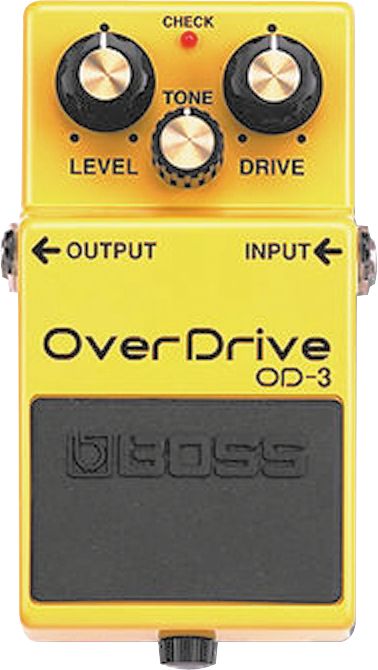
boss_od-3Some distortion effects provide an “overdrive” effect. Either by using a vacuum tube, or by using simulated tube modeling techniques, the top of the wave form is compressed, giving a smoother distorted signal than regular distortion effects. When an overdrive effect is used at a high setting, the sound’s waveform can become clipped, which imparts a gritty or “dirty” tone, which sounds like a tube amplifier “driven” to its limit. Used in conjunction with an amplifier, especially a tube amplifier, driven to the point of mild tonal breakup short of what would be generally considered distortion or overdrive, or along with another, stronger overdrive or distortion pedal, these can produce extremely thick distortion. Today there is a huge variety of overdrive pedals including the Boss OD-3 Overdrive.

Overdrive Distortion

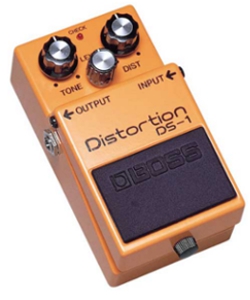
boss-distortion-pedal-ds-1Overdrive distortion is a well-known distortion. While the general purpose is to emulate classic “warm-tube” sounds, distortion pedals can be distinguished from overdrive pedals in that the intent is to provide players with instant access to the sound of a high-gain Marshall amplifier such as the JCM800 pushed past the point of tonal breakup and into the range of tonal distortion known to electric guitarists as “saturated gain.” Some guitarists will use these pedals along with an already distorted amp or along with a milder overdrive effect to produce radically high-gain sounds. Although most distortion devices use solid-state circuitry, some “tube distortion” pedals are designed with preamplifier vacuum tubes. In some cases, tube distortion pedals use power tubes or a preamp tube used as a power tube driving a built-in “dummy load.”
The Boss DS-1 Distortion is a solid state overdrive distortion pedal.

Fuzz

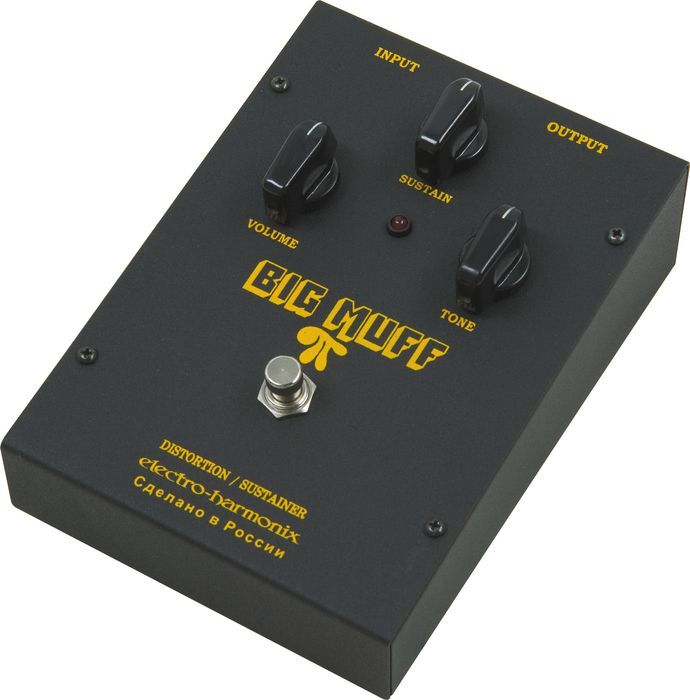
ehbigmuffrussiaFuzz was originally intended to recreate the classic 1960’s tone of an overdriven tube amp combined with torn speaker cones. Oldschool guitar players would use a screwdriver to poke several holes through the the guitar amp speaker to achieve a similar sound. Since the original designs, more extreme fuzz pedals have been designed and produced, incorporating octave-up effects, oscillation, gating, and greater amounts of distortion. The Electro-Harmonix Big Muff is a classic fuzz pedal.

Hi-Gain

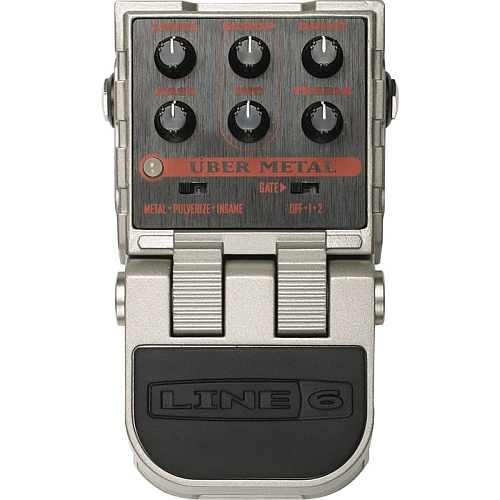
line6_ubermetalHi-Gain is the sound most used in Heavy metal. High gain in normal electric guitar playing simply references a thick sound produced by heavily overdriven amplifier tubes, a distortion pedal, or some combination of both–the essential component is the typically loud, thick, harmonically rich, and sustaining quality of the tone. However, the Hi-Gain sound of modern pedals is somewhat distinct from, although descended from, this sound. The distortion often produces sounds not possible any other way. Many extreme distortions are either hi-gain or the descendants of such.
An example of a hi-gain pedal is the Line 6 Uber Metal

Power-tube pedal

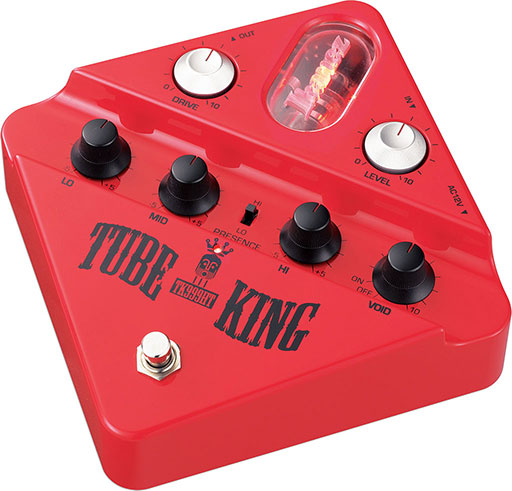
Ibanez-Tube-KingPower tube distortion is a unique kind of saturation when tube amps output stages are overdriven, unfortunately this kind of really powerful distortion only happens at high volumes. A Power-Tube pedal contains a power tube and optional dummy load, or a preamp tube used as a power tube. This allows the device to produce power-tube distortion independently of volume.
An example of a tube based distortion pedal is the Ibanez Tube King
 

Another way to distort

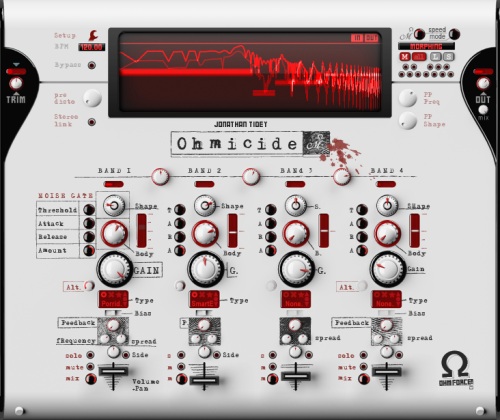
Digital Wave Shaping

ohmicideThe word clipping in recording is usually a bad thing. And generally it is, unless we’re trying to distort something on purpose. In the digital world we can use powerful wave shaping tools to drastically distort and manipulate a sound. Rather than subject you to the technical explanation of how it works, just listen to Nine Inch Nails, they use this a lot. It’s perfect for really harsh, aggressive, unnatural and broken sounds. The Ohmforce Ohmicide plugin is an example of this style.

Why Is This Important?

Alright, so why did I just explain those different types of distortion sounds? Because knowing those sounds can help you be a better musician, engineer and producer. It will help you make decisions on what gear to purchase and what is appropriate for a song.

What Else?

Besides guitar what else is distortion good for? Well, pretty much anything, as long as it’s appropriate for the song.
  • Slight distortion can make something sound more exciting, too much can sometimes make it really tiny sounding.
  • When recording electric guitars, you can get a way bigger sound by using less gain and recording the same part multiple times, double or quad-tracking.
  • Distortion can sound really cool on drums, but you may have to heavily gate the drums, the sustain can get out of control.

12.16.2011

Distortion Explained Part 1

Distortion Explained Part 1

It is hard to think about the sound of an electric guitar without thinking about distortion. There was a time when electric guitars were always clean. Hard to imagine now.
Traditionally distortion was an unwanted feature in amplifier design. Distortion only occurred when the amp was damaged or overdriven. Possibly the first intentional use of distortion was in the 1951 recording of “Rocket 88″ By Ike Turner and the Kings of rhythm.
Chuck Berry liked to use small tube amps that were easy to overdrive for his trademark sound and other guitarists would intentionally damage their speakers by poking holes in them, causing them to distort.
Leo Fender then started designing amps with some light compression and slight overdrive and Jim Marshall started to design the first amps with significant overdrive. That sound caught on quickly and by the time Jimi Hendrix was using Roger Mayer’s effects pedals, distortion would forever be associated with the electric guitar.

Not just for guitars
When you're recording and mixing, you can use a bit of distortion to give any sound more edge, grit, energy and excitement. Drums, vocals, bass, samples - they can all benefit from a touch of distortion at times. Understanding the different ways distortion can be created and how they sound can help you get better sounds and make better recordings.


So What Is Distortion?

The word distortion means any change in the amplified waveform from the input signal. In the context of musical distortion this means clipping the peaks off the waveform. Because both valves and transistors behave linearly within a certain voltage region, distortion circuits are finely tuned so that the average signal peak just barely pushes the circuit into the clipping region, resulting in the softest clip and the least harsh distortion. Because of this, as the guitar strings are plucked harder, the amount of distortion and the resulting volume both increase, and lighter plucking cleans-up the sound. Distortion adds harmonics and makes a sound more exciting.

Amp Distortion


Valve Overdrive

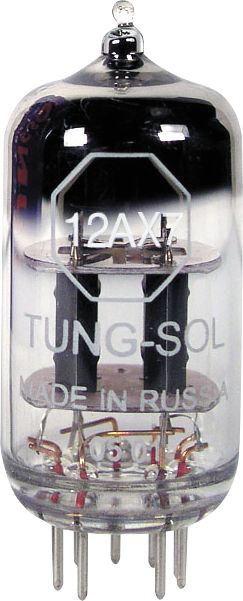
368322Before transistors, the traditional way to create distortion was with vacuum valves also known as vacuum tubes. A vacuum tube has a maximum input voltage determined by its bias and a minimum input voltage determined by its supply voltage. When any part of the input waveform approaches these limits, the valve’s amplification becomes less linear, meaning that smaller voltages get amplified more than the large ones. This causes the peaks of the output waveform to be compressed, resulting in a waveform that looks “squashed”. This is known as “soft clipping”, and generates even-order harmonics that add to the warmth and richness of the guitar’s tone. If the valve is driven harder, the compression becomes more extreme and the peaks of the waveforms are clipped. This adds additional odd-order harmonics, creating a “dirty” or “gritty” tone.
Valve distortion is commonly referred to as overdrive, as it is achieved by driving the valves in an amplifier at a higher level than can be handled cleanly. Multiple stages of valve gain/clipping can be “cascaded” to produce a thicker and more complex distortion sound. In some modern valve effects, the “dirty” or “gritty” tone is actually achieved not by high voltage, but by running the circuit at voltages that are too low for the circuit components, resulting in greater non-linearity and distortion. These designs are referred to as “starved plate” configurations.

Transistor Clipping
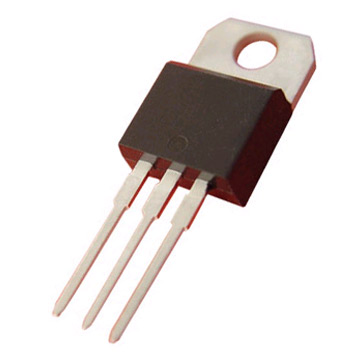
darlington_transistorTransistor clipping stages, on the other hand, behave far more linearly within their operating regions, and faithfully amplify the instrument’s signal until the input voltage falls outside its operating region, at which point the signal is clipped without compression, this “hard clipping” or limiting. This type of distortion tends to produce more odd-order harmonics. Electronically, this is usually achieved by either amplifying the signal to a point where it must be clipped to the supply rails, or by clipping the signal across diodes. Many solid state distortion devices attempt to emulate the sound of overdriven vacuum valves.
So that is basically how Tube and Solid state amps create distortion. Let’s talk about some different types of distortion sounds as found in effects pedals.

Tape Saturation

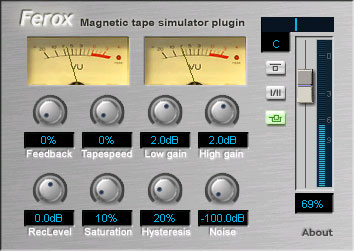
feroxAnother way to create distortion is with magnetic tape. Magnetic tape has a natural compression and saturation when you send it a really hot signal. Even today, many artists of all genres prefer analog tape’s “musical”, “natural” and especially “warm” sound. Due to harmonic distortion, bass can thicken up, creating the illusion of a fuller-sounding mix. In addition, high end can be slightly compressed, which is more natural to the human ear. It is common for artists to record to digital and re-record the tracks to analog reels for this effect of “natural” sound. While recording to analog tape is likely out of the home studio budget, there are tape saturation plugins that you can use while mixing that simulate the effect quite well. Most tape saturation effects are modeling both the magnetic tape and overloading of electronics.

Part 2 will cover the differences between various types of guitar distortions - Overdrives, Fuzz, hi-gain and more.

12.01.2011

Noise Gates Explained

Noise Gates Explained
A noise gate is a form of dynamics processing used to increase dynamic range by lowering the noise floor. A gate is an excellent tool for removing hum from an amp, cleaning up drum tracks between beats, background noise in dialog, and can even be used to reduce the amount of reverb in a recording.


Parameters

The common parameters for a noise gate are:
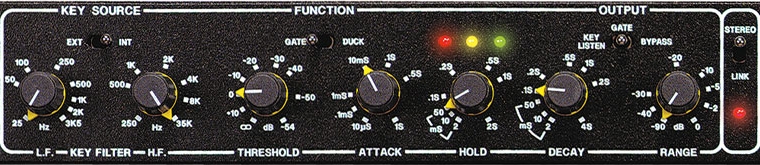
Threshold – sets the level that the gate will open, when the signal level drops below the threshold the gate closes and mutes the output
Attack – how fast the gate opens
Hold – how long before the gate starts to close
Release – aka Decay, how long until the gate is fully closed again
Range – how much the gated signal will be attenuated
Sidechain – the sidechain is for setting an alternate signal for the gate to be triggered from, sometimes called a Key
Filters – the filters section allows you to fine tune the sidechain signal.

What’s It For?

The normal use for gating is for removing background noise. An essential tool for clean dialog recording.
Some other uses for gates are gated reverb and using the sidechain to activate other effects.

How To Set A Noise Gate

To setup a gate properly, start with the the attack, hold, and release as fast as possible. Set the range to maximum, and the threshold to 0dB.
Start lowering the threshold until the sound starts to get chopped up by the gate. Slow down the attack time to remove any unnatural popping. Adjust the hold and release times to get a more natural decay.
If you don’t want the background noise to be turned down as much then you can reduce the range control.

Other Uses

Gated reverb was a popular effect in the 80s, mostly because of Phil Collins records.
To set it up, take your drum tracks and send them to a stereo reverb with a large room preset.
After the reverb insert a stereo gate. Adjust the gate settings so that the reverb is cut off before then next hit.
In this example you’ll hear the unprocessed drums, then with reverb, then adding the gate. Listen

Favorite Gates

The classic Drawmer DS201 is a hardware noise gate that is hard to beat.
The gate on the Waves SSL E-Channel is good, simple and effective.
The free ReaGate VST is quite good as well.
Noise gates aren’t very much fun to talk about, but they are a powerful tool that you need to know how to use.

10.03.2011

Featured Equipment Of The Week: Radial Re-Amping Kit

 Radial Re-Amping Kit
Re-amping kit contains J48 and X-Amp in rugged case. PSU included
Find out more | Radial Re-Amping Kit


Radial J48
The Radial J48 is a great sounding active direct box that has been optimized to produce maximum headroom while working within the limited current available from standard 48V phantom power. By employing a unique switching power supply, the J48 is capable of peak transients to 9 volts without choking. The result is lower harmonic distortion, half the inter-modulation distortion and significantly improved dynamics over other DIs.

Features include a -15dB pad, 180º polarity reverse, a unique merge function to mix two signals to mono, an 80Hz high-pass rumble filter, and ground lift. Like all Radial products, the J48 is built to handle the abuse on the road and features a unique welded I-beam construction for years of trouble free performance.

Radial X-Amp
The Radial X-Amp is an active re-amping device that presents the engineer / producer with a new and innovative creative tool that allows a pre-recorded track from a line level device to drive two guitar amplifiers or effect pedals simultaneously. This opens the door to explore new musical sounds and spur on the creative process.

Features include balanced line level input with LED peak indicator and level control, Class-A circuit topology for optimal reach and frequency response, direct and isolated guitar amplifier outputs, 180º polarity reverse to bring both amps into phase, and dual ground lift options for noise-free operation.

Buy Radial Re-Amping Kit at Revolution Audio

9.15.2011

Productivity tips for home recordists


Often our time to work or play in the studio is limited. There is nothing more frustrating to leave the studio feeling like you've got nothing accomplished. In this article I'll share some productivity tips that I use in my studio.
Don't blame the computer, it's your short attention span!

Remove distractions
If you find that you're spending more time on Twitter and Facebook than actually working on music, UNPLUG from the internet! Sometimes signing out and closing the browser isn't enough.  I do this when I really have to get something done on a deadline, otherwise it easily takes 5X longer. This will help avoid the urge to look online for new samples or plugins or DAW updates.
Next, turn off your cellphone or leave it in another room. It's just a good habit to get into. Besides being a potential distraction, a ringing phone can interrupt a recording and cell phones often cause interference in mics and guitar pickups.
Some people thrive in chaos. For me, a messy workspace is a distraction. I don't need anything on my desk except keyboard, mouse, and a cup of coffee or water. I like to do a 30 second clean up of my desk by taking a cardboard box and tossing everything I won't need into it. The box goes into the closet. Amazingly more than half this stuff never comes out of the box again.

Have a goal
If you go into the studio without a purpose, you probably won't accomplish anything. The goal doesn't have to be big, in fact it's better to have many smaller goals because it feels good to start and complete a task. Goals like "I'm going to learn Song X"; "I'm going to record all the vocals for my newest song"; or even "I'm going to play with this new synth plugin." It's ok to spend time learning a new technique or plugin, just try to keep the experiments separate from your 'work time'.

Be prepared
Make some songwriting templates so that you can get right into recording when inspiration happens. If you already have a bunch of songs recorded, you can remove all the audio files and save it as a template. Think about how much time you just saved!
A template for a heavy metal song would be something like 1 instrument track for virtual drums (already set to an appropriate metal preset), 3 audio tracks for guitars (panned Left, Right, Center) with high-gain amps on each and a 1/16th note delay on Center track, 1 audio track for bass, 2 audio tracks for vocals (with compression), 1 reverb bus.
An electronic music template could be several instrument tracks with your favorite synths on each and a few FX buses with your favorite presets.
Before you sit down to mix, make sure all the distracting timing and pitch issues are taken care of and all extraneous noises are removed. If you are going to replace some of the drums with samples, set up a few options ahead of time so when you're mixing, you're ONLY mixing, not editing and mixing.

Schedule breaks
This might seem a bit weird, but I've found this technique to be really effective, especially at crunch time on a project. I set a timer for 25 minutes, I work non-stop until the timer goes off. I do something else for no longer than 5 minutes. Then set the timer for another 25 minutes. After 4x 25 minute segments I break for 30 minutes. On the breaks you don't want to do anything that would fatigue you further. Washroom, snack, check Twitter, or just relax your eyes and ears. It really works!

What is YOUR distraction in the home studio?

9.05.2011

Featured Equipment Of The Week: Radial ProRMP passive reamp

Radial ProRMP
Re-amping has been the 'secret weapon' for countless recordings by the biggest names in the business and the process is often used on guitars, bass, keyboards, percussion and even voice to create new textures! The Radial ProRMP is a 100% passive re-amplifier that lets you to take a pre-recorded track and re-amplify it through a guitar amp or effects pedals to create new and exciting tones.
Plug and play easy to use, the ProRMP connects from the recorder to your amp and effects units and does all the impedance matching for you. Just adjust the level to suit!

Find out more | Radial ProRMP


TOP FEATURES


  • Play prerecorded tracks through amps and pedals
  • Opens the door to creative new tones and textures
  • Eliminates repetitive playing during recording
  • On board level control for fine tuning the gain
  • Transformer isolated to eliminate buzz and hum

    See all the details and buy Radial ProRMP at Revolution Audio
  • 9.01.2011

    Recording Bass Guitar

    Bass doesn't always get the attention it deserves in a recording situation. I see a lot of home recordists rush through bass recording, only to later be frustrated with the bass when it comes time for mixing. It's really too bad because it's the foundation of the song. A great bass will groove tight with the drums and support the guitars. Fitting it in the mix will take minimal effort and you will be loving life.

    A great recording starts with a great source. When it comes to tracking bass guitar, the source is comprised of many factors:

    • Musician:
      • Technique and playing position - Playing with a pick or with fingers or thumb. Intensity, Playing close to the bridge, in the middle or close to the neck. Choose what is appropriate for the song
      • What is played - playing bass lines that serve the song and don't clash with the drums or guitars rhythmically or melodically.
      • Tuning - Check the tuning often
    • Bass:
      • Strings - new strings usually sound best and give you the brightest tone to start with.
      • Electronics (Pickups and EQ) - The pickup selection and tone settings
      • Wood and construction - The wood used in the neck and body really effect the sound. Maple and Ash are bright and punchy, mahogany is thicker and darker.


    • Amplification chain:
      • Cable - debatable how much impact this has, how about just using one that doesn't hum or crackle if you move it.
      • Pedals - If a particular pedal helps get you the desired tone, go for it. I would hold off on spatial effects (delay, reverb) until mixing as they require their own attention.
      • Amplifier and EQ settings - tube or solid state. As a starting point put all EQ knobs at 6.
      • Cabinet - 1x12", 4x10", 1x15"
      • Cabinet position - where in the room, close to walls, on the floor or elevated

    Everything contributes to the sound you'll be recording, do whatever you can to get this close to what you need from the start. It won't be the same for every song so you may want to have a few options for basses, though a Fender Jazz bass or MusicMan is versatile enough to get you what you need 80% of the time. Rent or borrow what you don't own before looking for magical plugins to solve all your bass problems.

    In my experience getting good bass gear for recording made my life so much easier further along in my projects. For recording you don't necessarily need a massive bass rig, I use a Sterling Ray 34 (Low-end Music Man. Swamp ash body, maple neck, humbucker pickup with active EQ) into a small Ampeg BX112 solid state combo amp with a single 12" woofer. Greatest bass recording gear ever? Ha, far from it, but it got me so much closer to the sound I was looking for. Prior to that I was fighting with a mahogany bass that was deep but had almost no midrange when recorded making it hard to hear clearly in the mix.

    A great bass tone in the room is more likely to inspire a great performance. Now you need to capture and enhance it.

    • The Recording Chain:
      • Mic selection - Dynamic mics and large diaphragm condensers are most common for bass amps. Spend some time comparing.
      • Mic position - distance and angle play a big part as always.
      • Direct Box (DI) - A direct box allows you to split the signal from the bass, one side continues to the amp, the other goes to a preamp.
      • Microphone Preamp - Every preamp has its own tone. A pad option may be required.
      • Compressor - Optional but worth testing if you have the option. Its very common to compress the DI track while recording in pro studios.

    Record at a conservative level, if you're really digging in for a grindy tone keep the peaks no higher than -6dBFS (DAW metering). An average of anywhere from -18dB to -12dB is all you need. Dynamics will likely be reduced and additional processing is inevitable by the final mix. A clipped signal is useless.

    Can you get a great bass recording with just a DI (or plugging right into the interface)? Yes. Can you get a great bass recording with just an amp? Yes. Splitting the signal with a DI before the amp and recording to two tracks gives you more flexibility when it comes to mixing. You may prefer the sound of one over the other, or a blend of the two.

    When you do blend the DI and miked amp signals in your DAW it is very likely that you will hear some phase issues. The problem is caused by the DI signal gets to the interface before the mic signal does causing a slight delay. Try inverting the polarity of one of the tracks. This will usually be a dramatic improvement in the low frequencies. This can further be improved by delaying the DI track, often just by a few milliseconds or even samples. You might find it easiest to start with the tracks 'out of phase' then adjust the delay until you have the most cancelation, and invert the polarity again (now in phase). You may not get it to be absolutely perfect but do try to find the best compromise.

    By now you should have a good, very usable, better than average bass track recorded into your DAW. We won't get into processing and mixing bass in this article, if you really need info on that right now, check out the Sept 2011 issue of Sound On Sound, great tips on mixing bass in there.

    Have a listen to the audio examples I've prepared. Compare the different playing styles, mic position, mic type. In the delay compensation file, notice how the tone changes quite dramatically just by delaying the DI in increments of 10 samples.

    Bass Recording Examples by RevolutionAudio

    7.16.2011

    DOs and DON'Ts of Acoustic Guitar Recording

    DO keep your strings fresh (and keep the ends cut short)
    DO wash your hands before and after playing
    DO listen to the instrument to find the best mic placement
    DO wear closed-back headphones to avoid escaping noise
    DO find the spot in the room where the guitar sounds best
    DO try to breath quietly through your nose (yes this is a problem sometimes!)
    DO try to stay in the same position in front of the mics
    DO try different thicknesses of picks for different sounds

    DON'T forget to tune often
    DON'T place your mics close to the sound hole
    DON'T stop if you make a mistake
    DON'T assume the built-in pickup actually sounds anything like your guitar, not to say it can't be useful at times
    DON'T forget to empty your pockets of keys, change and cellphone
    DON'T rush through the recording, take your time now to get it right.

    7.12.2011

    Reason 6 Announced

    All you need is Reason


    Introducing Reason, version 6. The world's favorite music making platform is about to get a whole lot bigger, better, and ready for any idea you throw at it.
    With version 6 Reason reclaims the spotlight. Combining all the features from Record, version 6 adds audio recording and editing into Reason, along with Propellerhead's acclaimed mixing console with masterfully modeled EQ and dynamics on every channel, multiple parallel racks, all the effects you know and love plus new ones to fall in love with, and much more of what you've always wanted in Reason.

    In stores September 30th, 2011

    Find out more: http://www.propellerheads.se/reason6/