Great news from Radial Engineering! Every Primacoustic VoxGuard Vocal Isolator now includes a free set of TriPad Mic Stand Isolators.
Buy VoxGuard in the Revolution Audio online store.
Here you will find home recording news, tips and articles as well as reviews of new recording gear and software. Revolution Audio Canada exists to spark the home studio uprising by any means possible!
11.27.2012
11.26.2012
Sony Pro Audio mail-in rebates
From now to the end of the year Sony is running some great mail-in bonus offers to users.
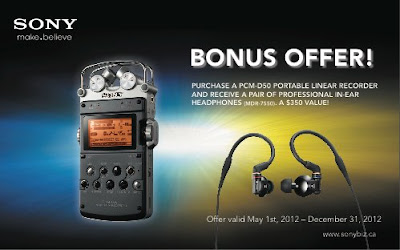
- Buy a PCM-D50 and get a free set of MDR-7750 in-ear headphones ($350 value).
download rebate form (pdf) - Buy a PCM-M10 and get a free docking case ($95 value).
download rebate form (pdf) - Buy a PCM-M10R (red) and get a free wind filter ($65 value).
download rebate form (pdf) - Get $15 back after buying MDR-7506 or MDR-7510 professional headphones
download rebate form (pdf)


Labels:
bonus,
free,
Headphones,
mail-in rebate,
portable recorder,
sale,
sony
11.02.2012
Featured Equipment: Samson Airline Micro Camera Wireless lav mic set
Samson Airline Micro Camera Wireless lav mic set
The AirLine Micro Wireless Camera System utilizes the latest in lithium-ion battery technology and high-quality audio and RF components, representing a breakthrough that is ideal for all video camera applications requiring outstanding audio, including DSLR video. The result is our smallest wireless system ever.
To eliminate continually changing batteries, Samson has designed this wireless system to be fully rechargeable with lithium-ion batteries for both the AL2 transmitter and AR2 receiver. The AR2DT double-docking station provides power to both units via a USB DC input, as well as a 3.5mm balanced audio output for the receiver. With AirLine Micro, the days of replacing batteries in your wireless camera system are over.
Find out more: Samson Airline Micro Camera
TOP FEATURES
AirLine Micro Wireless Camera System
The AirLine Micro Wireless Camera System utilizes the latest in lithium-ion battery technology and high-quality audio and RF components, representing a breakthrough that is ideal for all video camera applications requiring outstanding audio, including DSLR video. The result is our smallest wireless system ever.
To eliminate continually changing batteries, Samson has designed this wireless system to be fully rechargeable with lithium-ion batteries for both the AL2 transmitter and AR2 receiver. The AR2DT double-docking station provides power to both units via a USB DC input, as well as a 3.5mm balanced audio output for the receiver. With AirLine Micro, the days of replacing batteries in your wireless camera system are over.
Find out more: Samson Airline Micro Camera
AirLine Micro Wireless Camera System
- Wireless system with micro-sized AL2 transmitter, AR2 receiver and double dock
- Tone squelch and auto mute for clear operation
- Includes a system carry case, hot shoe mount, 3.5mm and XLR camera connectors, AC adapter and charging cables
- Beltpack transmitter and LM10 omnidirectional lavalier microphone
- Lithium-ion rechargeable battery (7-8 hours of operation)
- USB DC input for recharging
- Single button operation for power, mute and volume
- Multi-color LED displaying RF, low battery and power
- Low-profile wireless receiver (2.36” x 1.67” x .51”)
- Lithium-ion rechargeable battery (7-8 hours of operation)
- USB DC input for power and recharging
- 3.5mm balanced mic/line level output
- Multi-color LED displaying RF, low battery and power
- Provides secure base for AL2 transmitter during recharging and AR2 receiver during operation and/or recharging
- USB DC input for power and recharging (cables included)
- 3.5mm unbalanced audio output
Labels:
Featured Equipment Of The Week,
microphone,
portable,
Samson,
wireless
Mixing Acoustic Guitars
Acoustic guitars are one of the most dynamic and expressive instruments used in modern music. They have a broad frequency range covering almost the entire audible spectrum. The instrument can serve many different roles in an arrangement as a harmonic, melodic, or percussive element. All of these factors will affect how you approach both the recording and mixing acoustic guitars.
ContextThe first thing to do is think about its role in the song/mix. Is the guitar the main harmonic instrument? Is it supposed to enhance or thicken other harmonic instruments like electric guitars? Is it enhancing the melody, playing arpeggios or single notes? Is it a percussive element more like a shaker just to fill out the rhythm section? Figure out the goal, then you can begin processing.
Tone control
Depending on the guitar, microphone, pick, player and role in the arrangement, acoustic guitars always require at least a little equalization to fit in a mix. Cutting of nonmusical sub frequencies (everything below 100Hz) is a must. A low shelf may be required to tame the remaining low-end. In the midrange, take out any unflattering frequencies causing 'boxiness' or anything that might mask the vocals. A broad, gentle high shelf boost can enhance articulation and an overall more sparkly sound. The general strategy is to remove what you don't need, then enhance what you do.
Dynamics
An acoustic guitar performance is often extremely dynamic, which is often a problem. A compressor will even out the differences between loud and soft notes and help keep the level more constant throughout the track. It's easy to take it too far, so keep the gain reduction to no more than 3-4dB. The compressor's attack control will allow you to clamp down on the beginning of the notes, or when set slower (about 20-50ms) will enhance the transient which helps it stand out more in the mix.
At this point you may want to adjust the sound envelope further though use of a transient shaper. This tool can increase or decrease pick attack, and separately adjust sustain.
Depth
Sending your acoustic track(s) into a stereo reverb will add space and distance to the sound. The trick here is to not wash out the sound in a ton of reverb, but just to move the move the mics back a bit into an imaginary room. Usually, a short room type verb with the highs rolled off is the best bet. Try to make the reverb sound like an office or large bedroom - short decay with and a bit of early reflections. The predelay control will separate your source from the room.
Summary
And so, following the above strategy you should now have an acoustic guitar track with a balanced frequency response, even dynamics and sense of space around the instrument, (if that was what the track required). The track is ready to be put in the mix with the other instruments. Tweak the EQ in context with the other tracks, adjust the reverb send amount, and even EQ the reverb if needed.
Examples
Acoustic Raw
Acoustic Processed
10.15.2012
Featured Equipment: IK Multimedia Total Studio 3 software bundle
IK Multimedia Total Studio 3 software bundle
The Total Studio 3 bundle is the most complete solution for any DAW available on the market today, with a collection of 8 award-winning plug-ins, including 5 virtual instruments and 15 multi-sampled instrument Xpansion Tank 2 titles, plus 3 essential effects plug-in suites — with over 170 accurately modeled effects — covering every guitar, bass, mix and mastering need. The bundle is available at an amazing price that’s 80% lower than the cost of buying the components individually.
Find out more: Total Studio 3
The Total Studio 3 bundle is the most complete solution for any DAW available on the market today, with a collection of 8 award-winning plug-ins, including 5 virtual instruments and 15 multi-sampled instrument Xpansion Tank 2 titles, plus 3 essential effects plug-in suites — with over 170 accurately modeled effects — covering every guitar, bass, mix and mastering need. The bundle is available at an amazing price that’s 80% lower than the cost of buying the components individually.
Find out more: Total Studio 3
The Total Studio 3 bundle includes:
Virtual Instruments and Sounds:- SampleTank 2.5 XL
- Sonik Synth 2
- Miroslav Philharmonik
- SampleMoog
- SampleTron
- 15 Xpansion Tank 2 Multi-Sampled Instrument Collections
- AmpliTube 3
- including:
- AmpliTube Jimi Hendrix™
- AmpliTube Metal
- AmpliTube Custom Shop
- T-RackS 3 Deluxe
- Mastering Suite
- CSR - Classik Studio Reverb
10.02.2012
Featured Equipment: Primacoustic London 8 acoustic treatment kit
Primacoustic London 8 acoustic treatment kit
The Primacoustic London 8 is the perfect ‘studio in a box’ for those that have small rooms but plan on growing! It features a selection of 14 high performance Broadway panels for optimal sound absorption and maximum control.
Find out all the details: Primacoustic London 8
TOP FEATURES
Find out more and buy Primacoustic London 8 acoustic treatment kit at Revolution Audio
The Primacoustic London 8 is the perfect ‘studio in a box’ for those that have small rooms but plan on growing! It features a selection of 14 high performance Broadway panels for optimal sound absorption and maximum control.
Find out all the details: Primacoustic London 8

TOP FEATURES
- Complete recording studio in a box
- Live-end, dead-end (LEDE) room design
- High performance fabric covered acoustic panels
- Includes easy-mount hardware and screws
Find out more and buy Primacoustic London 8 acoustic treatment kit at Revolution Audio
9.24.2012
Featured Equipment: Presonus Central Station with remote
Presonus Central Station with remote
Central Station is a pro quality monitoring solution for studios. Presonus packed in a ton of features into this single-rack mount unit. Passive master monitor controller with LED Metering, 5 inputs including digital options, 3 monitor outputs, 2 headphone outputs, and talkback. The included CSR-1 remote puts all the essential controls just where you need them on your desktop. With Central Station, you can easily switch between three sets of stereo, analog input sources with individual level controls. Two stereo S/PDIF digital sources connect via one coax and one Toslink optical port. You can audition these sources with up to three pairs of speakers, with individual trim pots for each speaker—recessed to avoid accidents. You also get a pair of line-level main outputs, a pair of line-level cue outputs to feed a headphone-distributions system (such as our HP60 or HP4), and two screaming-loud headphone amplifiers with individual level controls.
Finally, with the included Control Station Remote (CSR-1), you can remote-control the Central Station's main volume, input select, output select, talkback, mute, dim, and mono functions from your desktop. The CSR-1 wires to the Central Station via a DE15 connector, enabling you to keep the Central Station in your rack and control it from your work surface, providing maximum convenience with minimum wiring.
Central Station is a pro quality monitoring solution for studios. Presonus packed in a ton of features into this single-rack mount unit. Passive master monitor controller with LED Metering, 5 inputs including digital options, 3 monitor outputs, 2 headphone outputs, and talkback. The included CSR-1 remote puts all the essential controls just where you need them on your desktop. With Central Station, you can easily switch between three sets of stereo, analog input sources with individual level controls. Two stereo S/PDIF digital sources connect via one coax and one Toslink optical port. You can audition these sources with up to three pairs of speakers, with individual trim pots for each speaker—recessed to avoid accidents. You also get a pair of line-level main outputs, a pair of line-level cue outputs to feed a headphone-distributions system (such as our HP60 or HP4), and two screaming-loud headphone amplifiers with individual level controls.
Finally, with the included Control Station Remote (CSR-1), you can remote-control the Central Station's main volume, input select, output select, talkback, mute, dim, and mono functions from your desktop. The CSR-1 wires to the Central Station via a DE15 connector, enabling you to keep the Central Station in your rack and control it from your work surface, providing maximum convenience with minimum wiring.
- Passive Audio Path - no op amps or IC's in main audio path
- Five stereo inputs (2 digital and 3 analog)
- 24-Bit/192kHz DAC (>117dB dynamic range) via SPDIF and TOSLINK
- Three sets of monitor outputs; each with passive volume control
- Talkback microphone with volume to feed headphone and cue output
- Accurate dual 30-segment LED for metering
- Two front panel headphone jacks with separate volume control
- MAIN and CUE stereo output have independent input source
- Included Control Station Remote (CSR-1) provides remote control of:
- Main Volume
- Input select
- Output select
- Talkback
- Mute
- Dim
- Mono
9.18.2012
Acorn Instruments Masterkey series MIDI keyboard controllers
Acorn Instruments is a new line for us. They make super affordable, bare-bones USB MIDI keyboard controllers for home studios.
Available in 3 sizes, they have a great synth-style action, a handful of essential controls, and come bundled with Presonus Studio One Artist!
Find out more
Acorn Instruments Masterkey series keyboard controllers are available in the Revolution Audio Online store.
Available in 3 sizes, they have a great synth-style action, a handful of essential controls, and come bundled with Presonus Studio One Artist!
Find out more
Masterkey features
• 25/49/61 note, velocity sensitive, synth-style keyboard
• Pitch bend and modulation wheels (assignable)
• 1 assignable fader
• 4 assignable knobs for real time control
• 3-character red LED segment display
• 1 sustain foot switch input jack, type-sensing (foot switch not included)
• Quick-toggle between real-time functions Octave, Transpose, Program Change and MIDI Channel
• Advanced MIDI functions
• USB class-compliant. No driver needed
• Includes Presonus Studio One™ Artist
Acorn Instruments Masterkey series keyboard controllers are available in the Revolution Audio Online store.
Labels:
Acorn Instruments,
Controller,
keyboard,
MIDI,
USB
Why RME Rocks. Ultra Low Throughput Latency
Looking for a high-end audio interface with ultra low latency? Have a look at RME and get the best performance for your home or project studio DAW.
Check out the full line of RME audio interface at Revolution Audio
![]() |
| RME UFX 30 i/o USB2/Firewire audio interface |
RME Germany: AVID, well known and respected manufacturer of the ProTools system, just released a HD Native Thunderbolt bridge to their interface PCIe link port.
The AVID webpage is accompanied by a chart comparing the 'Throughput Latency' of AVID's syst
ems to Apogee's Symphony 64 system, and to 'Top performing FireWire' and 'Top Performing USB systems'
At 96 kHz sample rate and a buffer setting of 64 samples their chart shows the best USB interfaces to have a 'throughput latency' of 7.0 ms. The term 'throughput latency' here seems not to be used for direct monitoring, but the complete input - DAW software - output chain. The total value depends mostly on the buffer size used, but has been given in this comparison already as a fixed 64 samples. RME would recommend a setting of 128 samples. With this setup RME's USB interfaces (Fireface UC, Fireface UCX, Fireface UFX, Babyface) measure a total roundtrip time of 365 samples, which - at the given sample rate of 96 kHz - equals 3.8 ms - half of what Avid thinks a 'Top Performing USB interface' can achieve. RME FireWire interfaces have a similar performance.
Conclusion: RME's FireWire and USB interfaces are double as quick as the industry leader in music production tools and hardware expects.
Check out the full line of RME audio interface at Revolution Audio
Labels:
Audio Interface,
firewire,
RME,
usb2
9.10.2012
Featured Equipment: Audio-Technica AT4040SP Mic Pack
Audio-Technica AT4040SP Mic Pack
The AT4040SP Studio Pack offers two of Audio-Technica’s renowned 40 Series studio condenser microphones: the AT4040 large-diaphragm side-address condenser and the AT4041 cardioid condenser. Each microphone is transformerless, resulting in exceptional transient response and extremely clean output signals; each is engineered to meet the most critical acoustic requirements of professional recording, broadcast and live sound. A shock mount, stand clamp and windscreen are included, along with a protective wooden carrying case.
Find out more: Audio-Technica AT4040SP
AT4040 Side-address cardioid condenser microphone
The AT4040SP Studio Pack offers two of Audio-Technica’s renowned 40 Series studio condenser microphones: the AT4040 large-diaphragm side-address condenser and the AT4041 cardioid condenser. Each microphone is transformerless, resulting in exceptional transient response and extremely clean output signals; each is engineered to meet the most critical acoustic requirements of professional recording, broadcast and live sound. A shock mount, stand clamp and windscreen are included, along with a protective wooden carrying case.
Find out more: Audio-Technica AT4040SP
AT4040 Side-address cardioid condenser microphone
- Technically-advanced large diaphragm tensioned specifically to provide smooth, natural sonic characteristics
- Externally polarized (DC bias) true condenser design
- Exceptionally low noise, wide dynamic range and high-SPL capability for greatest versatility
- Transformerless circuitry virtually eliminates low-frequency distortion and provides superior correlation of high-speed transients
- Precision-machined, nickel-plated brass, acoustic element baffle provides enhanced element stability and optimal sensitivity
- Open acoustical environment of the symmetrical housing assembly minimizes unwanted internal reflections
- State-of-the-art surface-mount electronics ensure compliance with A-T's stringent consistency and reliability standards
- Switchable 80 Hz hi-pass filter and 10 dB pad
- Smooth, extended frequency response with a slight rise occurring in the high-frequency region
- Ideal for drum overheads, acoustic guitar, piano, horns and under snare
- Low-mass diaphragm improves transient response, increases response bandwidth and reduces handling and mechanical noise transfer
- Transformerless circuitry virtually eliminates low-frequency distortion and provides superior correlation of high-speed transients
- State-of-the-art design and manufacturing techniques ensure compliance with A-T's stringent consistency and reliability standards
- Switchable hi-pass filter and rugged turned-brass microphone housing
6.17.2012
Re-amping Explained
Re-Amping is a technique used by recording and mixing engineers to process recorded audio with analog hardware specifically guitar equipment.
In our direct box basics article we explained the use of a direct box in the studio, a re-amp box is used to take that clean direct guitar or bass signal and run it into a guitar amp if needed later on in the production process.
See all DI and Re-Amp boxes at Revolution Audio
What does a re-amp box do?
It is often said that a re-amp box is just passive DI box in reverse, which is untrue. A DI box converts a high impedance, unbalanced instrument level signal to a low impedance, balanced mic level signal. A re-amp box converts a low impedance, balanced line level signal to high impedance, unbalanced instrument level signal.
The goal of the re-amp box is to make the amplifier react in exactly the same way a live guitar would, but with a pre-recorded audio source. Without the re-amp box there will be an impedance mismatch and loss of tone. Hearing your guitar rig play itself can take some getting used to!
How to?
Once you have the clean DI recorded, set the track's output to analog out 3 of your interface (you will need an interface with more than just monitor outputs). No other tracks should be set to this output. Connect output 3 of the interface to the Re-Amp box with a TRS to XLR-M cable. Connect the Re-Amp to your pedals or amplifier with a standard instrument cable. Check that you are getting a good signal to the amplifier, adjust the output level to match a live guitar input.
If the signal is noisy, try the ground lift switch.
Record the amplifier as normal with one or more microphones.
Double check your routing to prevent feedback.
Why Re-amp?
The decision to re-amp could be for a number of reasons:
While there are many fancy direct boxes, if you are planning on re-amping you will likely find the best results are achieved through the simplest direct capture. A Tube DI or Tube preamp may be too colored and change the sound of your amp. Warming up the sound of the mic on the amp, rather than the DI is the better option. Feel free to experiment of course.
Usually the signal you send to the amplifier will be completely unprocessed, however you may wish to experiment with gating, light compression, and EQ.
Much like the way your guitar volume affects the character of the amp, sending the right level out of your DAW can be critical.
Options
The Canadian company Radial Engineering offers several Re-Amp devices for home and professional studios:
Radial REAMP JCR $199.99
Radial X-Amp Active Re-Amp $199.99
Radial ProRMP $119.99
Radial Re-Amping Kit (includes X-Amp and J48 active DI)
In our direct box basics article we explained the use of a direct box in the studio, a re-amp box is used to take that clean direct guitar or bass signal and run it into a guitar amp if needed later on in the production process.
See all DI and Re-Amp boxes at Revolution Audio
What does a re-amp box do?
It is often said that a re-amp box is just passive DI box in reverse, which is untrue. A DI box converts a high impedance, unbalanced instrument level signal to a low impedance, balanced mic level signal. A re-amp box converts a low impedance, balanced line level signal to high impedance, unbalanced instrument level signal.
The goal of the re-amp box is to make the amplifier react in exactly the same way a live guitar would, but with a pre-recorded audio source. Without the re-amp box there will be an impedance mismatch and loss of tone. Hearing your guitar rig play itself can take some getting used to!
Once you have the clean DI recorded, set the track's output to analog out 3 of your interface (you will need an interface with more than just monitor outputs). No other tracks should be set to this output. Connect output 3 of the interface to the Re-Amp box with a TRS to XLR-M cable. Connect the Re-Amp to your pedals or amplifier with a standard instrument cable. Check that you are getting a good signal to the amplifier, adjust the output level to match a live guitar input.
If the signal is noisy, try the ground lift switch.
Record the amplifier as normal with one or more microphones.
Double check your routing to prevent feedback.
Why Re-amp?
The decision to re-amp could be for a number of reasons:
- Convenience - You may like to write and record guitar parts at 3 AM but your neighbours don't just don't understand. Record with an amp simulator silently and re-amp through your big rig later.
- Budget - There are many professionals with big amp collections offering a Re-amping services for much less than the cost of even renting the amp of your dreams.
- Experimentation - After you've got the perfect take captured you can experiment with different amp, cab, mic and positions as much as you like.
- Plan B - All too often we are rushed in the studio, it's easy to make a mistake with mic position or perhaps just a bit too much overdrive than we'd like. If the performance is fine we just have to tweak the amp.
While there are many fancy direct boxes, if you are planning on re-amping you will likely find the best results are achieved through the simplest direct capture. A Tube DI or Tube preamp may be too colored and change the sound of your amp. Warming up the sound of the mic on the amp, rather than the DI is the better option. Feel free to experiment of course.
Usually the signal you send to the amplifier will be completely unprocessed, however you may wish to experiment with gating, light compression, and EQ.
Much like the way your guitar volume affects the character of the amp, sending the right level out of your DAW can be critical.
Options
The Canadian company Radial Engineering offers several Re-Amp devices for home and professional studios:
Radial REAMP JCR $199.99
Radial X-Amp Active Re-Amp $199.99
Radial ProRMP $119.99
Radial Re-Amping Kit (includes X-Amp and J48 active DI)
Shipping Policy Update
Dear Revolution Audio Customer
Recently we changed our shipping charges:
- Orders up to $199.99 (before tax) are charged $14.95*
- Any order over $200 ships free*
*
Important Note: heavy or large items are subject to a small oversize
shipping charge. This charge is clearly displayed at the bottom in the
product profile.
International orders still require a custom shipping quote.
Labels:
news,
shipping,
store policy
6.12.2012
Featured Equipment Of The Week: Presonus AudioBox Studio Pack
Presonus AudioBox Studio Pack
The AudioBox Studio Pack includes all the essentials to get started with music production on your computer: an Audio Interface, a quality Condenser Microphone, Headphones, Studio One software and all required cables. All this at a great price!
Add a desktop or boom stand and you are ready to record.
See all the details: Presonus AudioBox Studio Pack
Includes
The AudioBox Studio Pack includes all the essentials to get started with music production on your computer: an Audio Interface, a quality Condenser Microphone, Headphones, Studio One software and all required cables. All this at a great price!
Add a desktop or boom stand and you are ready to record.
See all the details: Presonus AudioBox Studio Pack
- AudioBox computer recording interface
- M7 studio condenser microphone
- Studio One software
- HD7 studio headphones
- 3 meter XLR Cable
- 4+ GB of third-party software, loops, and instruments
5.29.2012
Featured Equipment Of The Week: AKG K44 Closed Back Headphones
AKG K44 Closed Back Headphones
AKG K44 are affordable closed-back headphones with supraaural (on the ear) cups that provide great isolation and sound quality for the price.
These popular low-cost recording headphones perform great all around the studio. Solid bass and clean highs at a value price.
Find out more here
The AKG K 44 are cost efficient headphones for various applications, as Project Studios and Home Recording. These closed-back, supraaural headphones are a true all-round performer with solid bass and clean highs at a value price. The AKG self-adjusting headband, leatherette ear pads and gimbal suspension ensure good comfort.
For professional and semi-professional users the K 44 is equipped with a 3.5/6.3 mm stereo adapter.
The K 44 is designed for ambitious and rugged use. The leatherette ear pads are easy to clean.
The K 44 are designed and engineered in Austria.
AKG K44 closed back headphones
AKG K44 are affordable closed-back headphones with supraaural (on the ear) cups that provide great isolation and sound quality for the price.
These popular low-cost recording headphones perform great all around the studio. Solid bass and clean highs at a value price.
Find out more here
The AKG K 44 are cost efficient headphones for various applications, as Project Studios and Home Recording. These closed-back, supraaural headphones are a true all-round performer with solid bass and clean highs at a value price. The AKG self-adjusting headband, leatherette ear pads and gimbal suspension ensure good comfort.
For professional and semi-professional users the K 44 is equipped with a 3.5/6.3 mm stereo adapter.
The K 44 is designed for ambitious and rugged use. The leatherette ear pads are easy to clean.
The K 44 are designed and engineered in Austria.
AKG K44 closed back headphones
Labels:
AKG,
Featured Equipment Of The Week,
Headphones
5.22.2012
Featured Equipment Of The Week - Sony PCM-M10 portable recorder
Sony PCM-M10 portable recorder
The Sony PCM-M10 is a compact handheld stereo recorder capable of 24/96 recording. Two omnidirectional condensers are built-in for high-quality on-the-go audio capture. Memory is expandable with micro-SD or Memory Stick Micro storage.
The PCM-M10 is also available in red finish.
The Sony PCM-M10 is a compact handheld stereo recorder capable of 24/96 recording. Two omnidirectional condensers are built-in for high-quality on-the-go audio capture. Memory is expandable with micro-SD or Memory Stick Micro storage.
The PCM-M10 is also available in red finish.
Top Features
- solid-state storage
- Built-in high quality electret condenser stereo microphones
- built-in speaker
- cross-memory recording
- digital pitch and key control
- digital limiter
- low-cut filter
- track mark functions
- 5-second pre-recording buffer
- A-B repeat capability
- USB high-speed port for simple uploading and downloading
- native .WAV or .MP3 format record
- durable construction
- long battery life using conventional AA alkaline batteries
Find out more: Sony PCM-M10 portable recorder
Labels:
Featured Equipment Of The Week,
field-recorder,
recorder,
sony
5.16.2012
Long Distance Music Collaboration
I recently started a long distance collaboration project with a friend in Australia. It's going well but it took a little while to get workflow and organization figured out. There are different considerations than I normally deal with day to day in a studio with musicians coming here. We're both recording and mixing as we go and transferring a lot of files back and forth, taking turns adding parts.
This article will go over some of the things to consider when doing long distance music collaboration.
![]() |
| Collaboration Screenshot |
If all collaborators are using the same DAW it makes things much easier. Use the stock plugins wherever possible. Pro Tools, Logic, Cubase, it doesn't really matter which one but it's a big advantage to use the same one. We chose to do these projects in Reaper as this is my main DAW and one Joel has been wanting to learn, and can demo free.
Transferring files and backup
Normally I would recommend Dropbox for collaboration, I've used it before and actually ran the projects right from the shared folder. It's nice because you don't have to worry about transferring or backup. Because this project is going to be 4-6 songs we'd likely run out of space quickly especially when we get real drums on the songs. So for this project I just set up an FTP account and use the storage that comes with my website. Backup is taken care of automatically as all files are now saved in 3 places.
Versioning
For each turn in the project as it gets passed around gets a new version number. "Project 01-4" would be the forth time something was done on the project. Doing a "save as" for the project file avoids confusion as to which is the most recent. We're keeping it simple but you could take this further, odd numbers for you and even version numbers for the partner.
Printing FX
It's unlikely that you'll have an identical system and set of tools as your collaborator. You will want to use the best or most familiar tools you have available to get the best sounds. To make this more collab friendly, you have to commit and print these effects as audio files. Sometimes that means using the freeze or render function, or routing the audio internally to a new track. You don't have to delete the originals of course, but if it sounds good why not just stick with it? For our project this means rendering the virtual drum patterns as audio files, and printing my special reverbs as audio.
DI Tracks
Similar to the above, with guitars and bass with virtual amps, it's likely you will want to tweak or completely change the sound later on as the ideas turn into a song. Even if you're recording with amps and mics, splitting the signal with a DI will give you both options or at least a backup.
Communication
One thing we've found to help keep excitement and momentum for the project is all the ways we can communicate these days. We use Twitter, Facebook, email, and Instagram to talk about the project share photos and prod one another if we're taking too long for a turn. It's a lot of fun and we're pushing each other to play better and be more creative.
Don't let geography get in the way of music making. Find people you want to work with and just do it. Be open to experimentation, play your best and be honest with your partner. Most of all have fun.
Featured Equipment Of The Week: IK Multimedia iRig MIDI
IK Multimedia iRig MIDI
iRig MIDI is an ultra-compact standard Core MIDI interface for iOS that connects any MIDI compatible device to the iPhone®, iPod touch® and iPad®.
iRig MIDI is the only compact iOS MIDI interface sporting 3 MIDI ports: IN/OUT/THRU. These connect to any standard MIDI jacks using the included 2 x 1.6m/5.2’ cables. iRig MIDI also has 2 LEDs for displaying the MIDI activity on the IN and OUT ports.
iRig MIDI also exclusively provides a micro USB port – with included cable – that connects to any standard USB power supply source so that the iOS device can stay fully powered during long sessions.
Find out more: iRig MIDI
TOP FEATURES
iRig MIDI is an ultra-compact standard Core MIDI interface for iOS that connects any MIDI compatible device to the iPhone®, iPod touch® and iPad®.
iRig MIDI is the only compact iOS MIDI interface sporting 3 MIDI ports: IN/OUT/THRU. These connect to any standard MIDI jacks using the included 2 x 1.6m/5.2’ cables. iRig MIDI also has 2 LEDs for displaying the MIDI activity on the IN and OUT ports.
iRig MIDI also exclusively provides a micro USB port – with included cable – that connects to any standard USB power supply source so that the iOS device can stay fully powered during long sessions.
Find out more: iRig MIDI
TOP FEATURES
- Standard Core MIDI interface connects any MIDI hardware device to Core MIDI-compatible apps like SampleTank FREE and GarageBand
- Directly connect MIDI keyboards, synthesizers, drum machines, drum pads, pedal boards and more using the included 2 x 5.2’ (1.6 m) MIDI 5-pin DIN cables
- 3 MIDI ports: IN/OUT/THRU
- 2 LEDs for MIDI IN/OUT activity display
- Micro USB port can charge the iOS device while in use
- Free apps included*: SampleTank FREE the powerful sample-based sound module app and iRig MIDI Recorder FREE
Labels:
Featured Equipment Of The Week,
IK Multimedia,
ios,
iPad,
ipad2,
iPhone,
keyboard,
MIDI,
Sampletank,
synth
5.09.2012
Alan Parsons Master class recording workshop in Toronto
On May 26th at Noble St. Studios in downtown Toronto, a very cool event is happening. GlobalMusicDepot is putting on the Alan Parsons' Master Class and Training Session.
It's a one of a kind studio session with legendary producer Alan Parsons, a team of pro players in one of Toronto's top studios.
This limited seating event isn't free of course, GOLD level admission costs $400 and gets you a seat in the Noble Street lounge with A/V feed of the event. The PLATINUM level ticket for $800 you get into the control room with Alan as the magic happens.
Both ticket levels include the $150 value Art & Science of Sound Recording 3 DVD set.
Order GOLD level admission to Master Class
Order PLATINUM level admission to Master Class.
Here's a video recap of the recent LA Master Class session
It's a one of a kind studio session with legendary producer Alan Parsons, a team of pro players in one of Toronto's top studios.
This limited seating event isn't free of course, GOLD level admission costs $400 and gets you a seat in the Noble Street lounge with A/V feed of the event. The PLATINUM level ticket for $800 you get into the control room with Alan as the magic happens.
Both ticket levels include the $150 value Art & Science of Sound Recording 3 DVD set.
Order GOLD level admission to Master Class
Order PLATINUM level admission to Master Class.
Global Music Depot is proud to announce the first Canadian Master Class Training Session with Alan Parsons, at the fabulous Noble Street Studios in Toronto on May 26, 2012.
Attendees of this incredible experience will have the rare opportunity to participate in a recording session with the legendary Alan Parsons in the producer’s chair. Session musicians for the event feature the acclaimed Toronto band, the David Barrett Trio (plus one).
This 1-Day hands-on session is suitable for those with some knowledge of DAW recording and experience as musician, engineer, or producer. Also fitting for music production/recording students and home studio enthusiasts. Live tracking; vocals and basic mixing will be covered. Attendees get to witness all stages of a recording session with Alan Parsons, from tracking to overdubs (including lead and backing vocals) to mixing.
All attendees will receive a free copy of the Alan Parsons’ 3 DVD set – The Art & Science of Sound Recording (Retail Value $149.99) as well as a “By Invitation Only” ticket to the evening’s VIP “Meet & Greet” event.
Alan Parsons has been conducting these Master Classes for the past 3 years and they consistently sell out!! GOLD-level seating is extremely limited. Don't delay!
Here's a video recap of the recent LA Master Class session
5.08.2012
Featured Equipment Of The Week: QuikLok Z-600 Dual level workstation with rack
QuikLok Z-600 Dual level workstation with rack
An ergonomic and efficient workspace is incredibly important. Think you can find a great home studio desk at the local office supply store? Not likely!
The QuikLok Z-600 is a dual level workstation designed for DAW production in mind. The top shelf can be used for nearfield monitors and computer screen. Below the shelf is an 8 rack spaces to keep your interface and processors within easy reach. A large contoured work surface provides ample space for a MIDI controller and computer peripherals.
The matching Z-612AM extension rack fits neatly to left or right of the Z-600 giving you more work surface and 12 more rack spaces.
See all the details: QuikLok Z-600 $450 at Revolution Audio
An ergonomic and efficient workspace is incredibly important. Think you can find a great home studio desk at the local office supply store? Not likely!
The QuikLok Z-600 is a dual level workstation designed for DAW production in mind. The top shelf can be used for nearfield monitors and computer screen. Below the shelf is an 8 rack spaces to keep your interface and processors within easy reach. A large contoured work surface provides ample space for a MIDI controller and computer peripherals.
The matching Z-612AM extension rack fits neatly to left or right of the Z-600 giving you more work surface and 12 more rack spaces.
See all the details: QuikLok Z-600 $450 at Revolution Audio
5.03.2012
12 ways to use your iDevice in the studio
In recording sessions it's usually a good idea to keep the phone on
silent and keeping it out of sight until it's actually needed. Avoid the distraction. This goes
for engineers, musicians and especially interns.
Give the client your full attention. If your phone goes off in the
session, guess who's buying the first round.
Aside from being a tremendous distraction in the studio, the iPhone actually does have several helpful uses for music making.
Here are 12 reasons why an iPhone or iPad are useful in the studio
Bonus tip: If you're using your iDevice in a live situation, which is becoming very common these days, set it to 'airplane mode' to prevent notifications or phone calls from interrupting your set.
Check out our selection of iPhone and iPad accessories in the Revolution Audio Online Store.
Aside from being a tremendous distraction in the studio, the iPhone actually does have several helpful uses for music making.
Here are 12 reasons why an iPhone or iPad are useful in the studio
- Sound sources - There are an enormous number of synths, drum
machines, sequencers, samplers and more available very inexpensively
that can be used for songwriting or integrated into your DAW.

Rhythm Studio - Handy recorder - Want to capture a sound or idea anywhere? The FiRe 2 app turns the iPhone into a great field recorder. With an iRig Pre (shipping next month) you can now use your studio condensers for much improved audio quality.
- Transport controls - Play, Stop, Record remote control away from the computer. Great for the drummer or guitarist that records himself.
- Touch automation controller - Using an app like Touch OSC or AC-7 you can also have mixer and plugin control over wifi.
- Lyrics and notation pad - It's not uncommon to have singers and rappers come into the studio and have all their lyrics with them on their phone. The iPad works great for sheet music.
- Photos, video and documentation - There is now no excuse not to take a photo to document amp or pedal settings, make notes or just capture the moment. Fans and audio guys love seeing behind the scenes studio photos and video.
- Musical calculator - There's a great free app called Backline Calc that can handle a 23 common conversion and calculation tasks that come up in the studio. Timecode, delay times, pitch to MIDI note number,
- Virtual guitar amp - Use the IK Multimedia original iRig or new iRig Stomp to get studio quality guitar tones anywhere with the free Amplitube app.
- Vocal effects - The iRig Mic is a handheld condenser mic that is great for podcasts and interviews but combined with the VocalLive Free app, you can have studio style vocal effects anytime.
IK Multimedia iRig Mic - Metronome - Every musician needs a click to practice with, a quick search in the App store comes up with 50 different apps including many highly rated free ones. No excuses.
- Ear training - Quiztones is an app to help improve your listening and frequency identification skills.
- Order takeout - There is nothing better at the end of a long workday in the studio than having pizza and wings or Thai food delivered as a reward for your hard work.
Bonus tip: If you're using your iDevice in a live situation, which is becoming very common these days, set it to 'airplane mode' to prevent notifications or phone calls from interrupting your set.
Check out our selection of iPhone and iPad accessories in the Revolution Audio Online Store.
Labels:
apps,
ios,
iPad,
iPhone,
mobile music
Subscribe to:
Posts (Atom)